Thursday, April 12, 2007

MOSS 2007: OnLick A Link Open in Separate Window using SharePoint Designer

Open in New Window when you click a link in your sharepoint 2007. Do do this in your sharepoint 2007, first open your sharepoint site in your SharePoint Designer as follows.


And just go to the code view and simply add target="_blank" to each anchor tag , that will make your sharepoint 2007 site to open the links in new window.


Sunday, April 08, 2007

Enterprise Library 3.0 April 2007

Enterprise Library 3.0 April 2007

The patterns & practices group is pleased to announce the latest addition to our library of architecture and development guidance, Enterprise Library 3.0

This deliverable is available on MSDN at:
http://msdn.microsoft.com/entlib

Download Enterprise Library 3.0 – April 2007

Windows Workflow Foundation Web Workflow Approvals Starter Kit released

Windows Workflow Foundation Web Workflow Approvals Starter Kit, A starter kit web application that includes task oriented workflow using Windows Workflow Foundation as beeb released my microsoft on 4/6/2007.

Windows Workflow Foundation Web Workflow Approvals Starter Kit, April 2007

Thursday, April 05, 2007

Disable Custom Error Message in SharePoint 2007

Disable Custom Error Message in SharePoint 2007. To see the call stack when an error occurs in the sharepoint, instead of being redirected to the error page which as the custom user friendly error messages in sharepoint 2007.

1) First open the web.config file for your site, which will be located InetPub folder.
2) In the web.config file, search for the tag, in the tag, locate the tag and change it to CallStack="true".
3) In the web.config file, search for the tag, within the tag, locate the tag and change it to
4) And save the changes in the web.config file and close.

Now whenever the error occurs in the site it will display the original error message and not the custom error messages of the SharePoint 2007.

Adding Users in MOSS 2007 after Forms Authentication is enabled

How to add Users to MOSS 2007 after Forms Authentication is enabled

After enabling forms authentication in your MOSS 2007 site you can add user from your SQL database as a Administrator alone. For other users to access your site you need to do some small change in your machine.config file located at

C:\WINDOWS\Microsoft.NET\Framework\v2.0.50727\CONFIG

By default your machine.config file as the following connection string which is pointing to SQL express database.

<connectionStrings> <add name="LocalSqlServer" connectionString="data source=.\SQLEXPRESS;Integrated Security=SSPI;AttachDBFilename=DataDirectoryaspnetdb.mdf;User Instance=true" providerName="System.Data.SqlClient" /> </connectionStrings>

change this connection string to your SQL database connection string which you already using for your forms authentication your MOSS 2007 site.

for example i'm using

<connectionStrings> <clear /> <add name="LocalSqlServer" connectionString="Server=SERVERNAME;Integrated Security=SSPI;Database=aspnetdb;" providerName="System.Data.SqlClient" /> </connectionStrings>

Now this will connect to your profile database which is used for Forms authentication in MOSS 2007.

And now to over come the following error

Go back to site Error: Access Denied
Current User You are currently signed in as:

Open your central administrator of your MOSS 2007 and select the Application Management tab. Under the Application Security select Policy for Web application after selecting just click on the add user button and proceed through the navigation and Choose Users you want to add and set rights for them in the process.

Another way is login with your site administrator. select Site Actions, then Site Settings, then People And Groups. Select the New button to add a user to the site. This will also works.

Wednesday, April 04, 2007

MOSS 2007 'no match found' when trying to add users from sqlmembership database as Administrators

'no match found' problem in MOSS 2007:

After enabling your Form Authentication using SQL Membership Provider, when you try to add users using Site collection administrators under the SharePoint Site Management inside Application Management of your Central administrator you will get 'no match found'. To resolve this problem.

Root through the path C:\WINDOWS\Microsoft.NET\Framework\v2.0.50727\CONFIG and open your machine.config and get the membership and role provider details under your system.web tag.

<system.web>
<processModel autoConfig="true" />
<httpHandlers />
<membership>
<providers>
<add name="AspNetSqlMembershipProvider" type="System.Web.Security.SqlMembershipProvider, System.Web, Version=2.0.0.0, Culture=neutral, PublicKeyToken=b03f5f7f11d50a3a" connectionStringName="LocalSqlServer" enablePasswordRetrieval="false" enablePasswordReset="true" requiresQuestionAndAnswer="true" applicationName="/" requiresUniqueEmail="false" passwordFormat="Hashed" maxInvalidPasswordAttempts="5" minRequiredPasswordLength="7" minRequiredNonalphanumericCharacters="1" passwordAttemptWindow="10" passwordStrengthRegularExpression="" />
</providers>
</membership>
<profile>
<providers>
<add name="AspNetSqlProfileProvider" connectionStringName="LocalSqlServer" applicationName="/" type="System.Web.Profile.SqlProfileProvider, System.Web, Version=2.0.0.0, Culture=neutral, PublicKeyToken=b03f5f7f11d50a3a" />
</providers>
</profile>
<roleManager>
<providers>
<add name="AspNetSqlRoleProvider" connectionStringName="LocalSqlServer" applicationName="/" type="System.Web.Security.SqlRoleProvider, System.Web, Version=2.0.0.0, Culture=neutral, PublicKeyToken=b03f5f7f11d50a3a" />
<add name="AspNetWindowsTokenRoleProvider" applicationName="/" type="System.Web.Security.WindowsTokenRoleProvider, System.Web, Version=2.0.0.0, Culture=neutral, PublicKeyToken=b03f5f7f11d50a3a" />
</providers>
</roleManager>
</system.web>

Use your machine.config membership, roleManager and other details in your central administrator and your web site's web.config.

Then your 'no match found' problem will be solved and you will get the perfect result like this...



MOSS Form Authentication -- EXECUTE permission denied on object 'aspnet_CheckSchemaVersion', database 'aspnetdb', schema 'dbo'

When enabled form authentication in my MOSS 2007 i'm getting "EXECUTE permission denied on object 'aspnet_CheckSchemaVersion', database 'aspnetdb', schema 'dbo'"

Later exploring the problem and found the solution. By executing the following SQL commands will solve the problem.

USE aspnetdb
GO
sp_addrolemember 'aspnet_Membership_FullAccess', 'Network Service'


“Network Service” is your user name.

Tuesday, April 03, 2007

Forms Authentication with WSS 3.0 the best source i found in web...

Forms Authentication with WSS 3.0 the best source i found in web...
http://channel9.msdn.com/ShowPost.aspx?PostID=229709

Run the Video in this link and you will get the perfect solution for Forma Authentication for MOSS 2007.

Adding to the above:
http://meiyinglim.blogspot.com/2006/07/implementing-forms-authentication-in.html

Problem while enabling Form Authentication in MOSS 2007

While enabling the form authentication in MOSS 2007 i was facing this problem.

Could not find stored procedure 'dbo.aspnet_CheckSchemaVersion'

This is because the Application Services Database for SQL Server is not configured in your Database in which you want to enable the form authentication. Run the Aspnet_regsql.exe your configuration problem will be solved. For more about the Aspnet_regsql.exe refer

http://msdn2.microsoft.com/en-us/library/x28wfk74.aspx

Joined the Elite Members Club - MVP


Finally this week i got my Microsoft MVP for Visual Developer - ASP/ASP.NET


Saturday, March 31, 2007

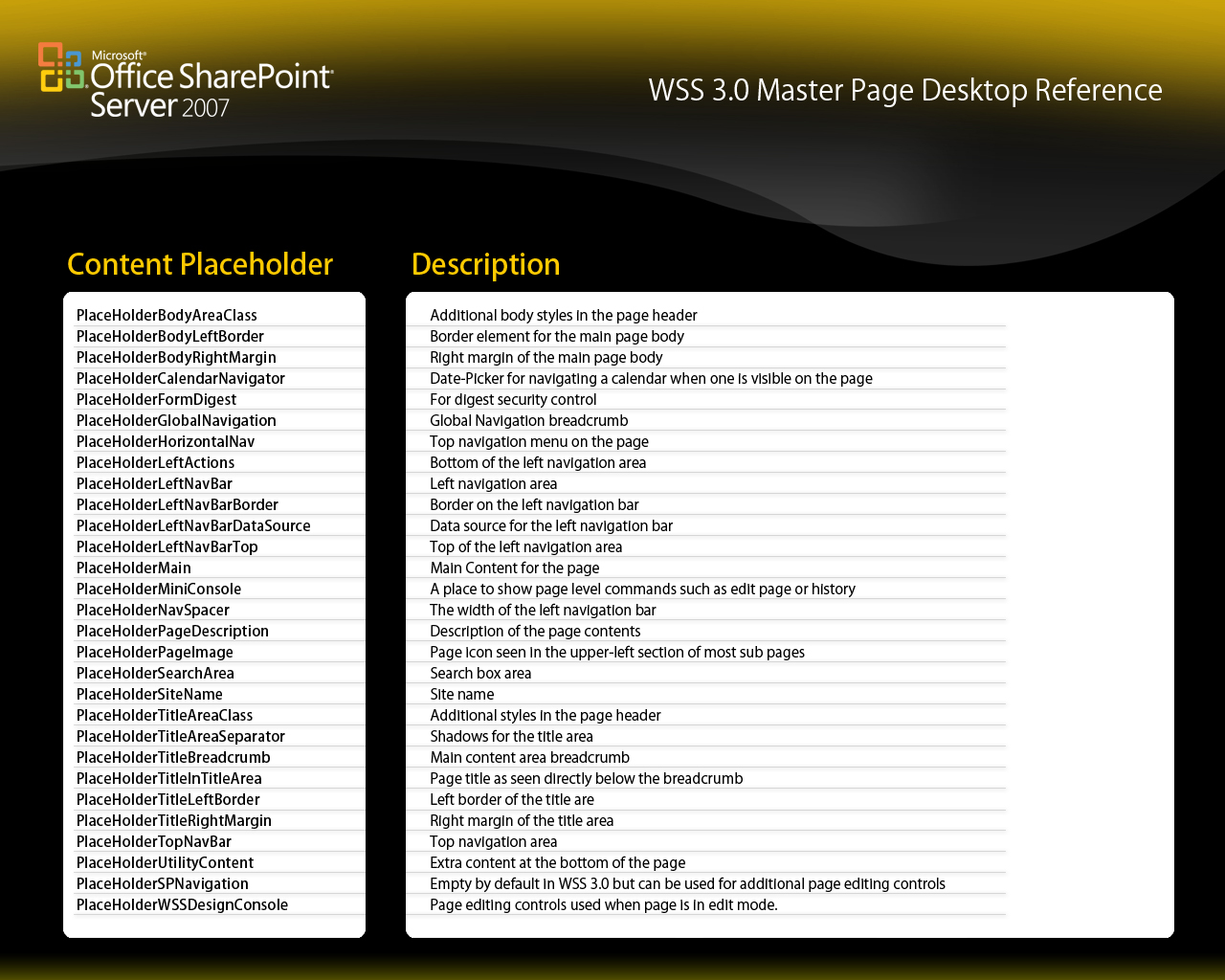
Master Pages and Content PlaceHolder’s for WSS 3.0

Master Pages and Content PlaceHolder’s for WSS 3.0:

It can be difficult to maintain a standard look if you must always put the common pieces in place with every web form you build. In ASP.NET 2.0, master pages will make the job easier. The Windows SharePoint Services 3.0 default master page contains several ContentPlaceHolder controls to enable easy customization to an individual content page. In Web you can get more details about the placeholder which has been a huge help in Customization.

One of the sharepoint blogger prepared this reference image for sharepoint professionals, this will be more usefull one.

Thursday, March 22, 2007

Remove or Disable 'MySite' in MOSS 2007

Remove or Disable 'MySite' in MOSS 2007

Disabling MySite in MOSS 2007 was big question in our team, because we are very new to this sharepoint and MOSS 2007. Later analysing and reading a Microsoft content i got clue about how to hide or disable MySite, using that i found the solution

Let me start how to do that. First you have to login as MOSS 2007 administrator. Because you need to be administrator to do this operation. Then open your SharePoint Central Administrator 3.0. Click on the Shared Servics Administration in you left side of the Quick Link.


And select your SSP(shared services providers) which is running your MySite Functionalities. Under the User Profiles and My Sites select the Personalization services permissions.


After this you need select the group of users to be limited this MySite feature anymore. I'm selecting the NTAuthority\Authenticated Users to be limited, this will do the same for you.


And now after select the checkbox click Modify Permissions of Selected Users to proceed to the next screen. To disable MySites uncheck "Create Personal Site" in this screen and click save.


That's it. This will work fine. If your new to MOSS 2007 or sharepoint this will be more usefull.

Saturday, March 17, 2007

Install/Upload New Site Templates in MOSS 2007

Install/Upload New Site Templates in MOSS 2007

In this blog let me tell you how to install the new site templates in your MOSS 2007. First get your site templates created by you or download the latest Site Templates released by Microsoft.

Application Templates for Windows SharePoint Services


After downloading the latest Application Templates EXE file, extract all the site templates to a folder. Now you will get site template files of two different file extensions .wsp and .stp.


Now we are going to install all the extracted site templates to your sharepoint. First log on to your Central Site Administrator and then in the Site Actions drop-down menu in the top right, select Site Settings.


And now under the Galleries section, select Site templates to proceed for the next step.


Now select upload to load an application template into this SharePoint site. If you are planned to upload more then one site template the choose multiple upload option.


After selecting the upload option, browse through the path and select the site templates you want to install.


Now click ok to upload the site templates.


And now you can check the site templates which are install will be available in your Site Tamplate Gallery.


All your newly installed site templates will be available in your custom tab.


Hope this article will help you guys to install site template in MOSS 2007.

Friday, March 16, 2007

My New Article on Microsoft WPF

My New Article on Microsoft WPF is published on codeproject.com

"Step into the new Microsoft Windows Presentation Foundation (WPF)"
http://www.codeproject.com/WPF/WPFintro.asp

Tuesday, March 13, 2007

MOSS 2007 article published in codeproject.com

My new article on MOSS 2007 migration article is published in codeproject.com

"Migration from Microsoft Content Management Server 2002 to Microsoft Office Sharepoint Server 2007."

http://www.codeproject.com/spoint/MCMS.asp

Thursday, March 08, 2007

Microsoft Windows Workflow Foundation (WF) Introduction - My first step!

Microsoft Windows Workflow Foundation (WF)

Windows Workflow Foundation is the programming model, engine and tools for quickly building workflow enabled applications. WF radically enhances a developer’s ability to model and support business processes.

Introduction:

Windows workflow is a part of .NET 3.0 framework. This will help the developers and IT professionals to create Business process managed application. Workflow is consist of four parts Activity Model, Workflow Designer, Workflow Runtime and Rules Engine.

You can download the windows workflow from the following below mentioned links.
Microsoft® Visual Studio® 2005 Extensions for Windows® Workflow Foundation Release Candidate 2

You can get the .NET 3.0 framework from the below link.
Microsoft .NET Framework 3.0 Redistributable Package

My first sample - WF (Sequential Workflow Console Application)

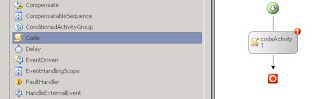
First create a new sequential workflow console application project using your visual studio 2005.


Then open the solution explorer and delete the workflow1.cs from your create from your project.


After deleting the workflow1.cs, select your solution and right clik and add new item to your solution.


After selecting add new item you select the item template named Sequential Workflow (with code separation) and click the Add button to add the new workflow to your solution project.


The new Sequential Workflow project will now contain two files: Workflow1.xoml and Workflow1.xoml.cs. Workflow1.xoml contains the XML markup that represents the workflow type. Workflow1.xoml.cs contains the code-beside class for the workflow. Double click on the Workflow1.xoml file in Solution Explorer to open the Visual Studio workflow designer.


Selecting the smart tag will cause the Properties tool window to be displayed with the ExecuteCode property highlighted. Enter the value codeActivity1_CodeHandler for the ExecuteCode property and press Enter.


Code:

private void codeActivity1_ExecuteCode(object sender, EventArgs e)
{
Console.WriteLine("My first WF code sample");
}

After successfully building the solution, while running the project you will get the following message as output.


Download Sourcecode

Tuesday, March 06, 2007

“WPF/E” (codename) Community Technology Preview for Windows

Using the Windows Presentation Foundation (formerly codename “Avalon”), you can provide your users with world-class content and document experiences within your application. Windows Presentation Foundation (WPF) provides developers with a unified programming model for building rich Windows smart client user experiences that incorporate UI, media, and documents.

WPF (Windows Presentation Foundation)

“WPF/E” (codename) Community Technology Preview for Windows (Feb 2007)
http://www.microsoft.com/downloads/details.aspx?familyid=e63992d3-ccf5-40b9-b98a-d16bca57467c&displaylang=en

“WPF/E” (codename) Community Technology Preview Sample Pack (Feb 2007)
http://www.microsoft.com/downloads/details.aspx?FamilyId=515684FD-C8A0-4588-88C5-54CE224925E7&displaylang=en

WPF/E” (codename) Software Development Kit (SDK) Community Technology Preview (Feb 2007)
http://www.microsoft.com/downloads/details.aspx?FamilyID=c744cbb8-d4d9-4bf9-ad5c-eef36e064911&displaylang=en

Others:

Microsoft Expression Web Free Trial
http://www.microsoft.com/downloads/details.aspx?familyid=44FA7F93-7D57-4523-B0C9-2CE54397B732&displaylang=en

Microsoft® Expression Web Quickstart Guide
http://www.microsoft.com/downloads/details.aspx?familyid=3119F516-A14A-4144-848F-0390DD13EB60&displaylang=en

Friday, March 02, 2007

Enable content search in MOSS: Search visibility setting in MOSS 2007

Search visibility setting is available in MOSS 2007, which will enable the page content search in your MOSS search. By enabling this Search visibility in your MOSS 2007, it will index your entire page content for your search. To enable this to site setting under site administration you can find Search visibility.


In the above two steps we can enable content search in MOSS 2007.

Tuesday, February 20, 2007

SharePoint Caml Viewer for MOSS 2007

SharePoint Caml Viewer for MOSS 2007

SharePoint Caml Viewer for MOSS 2007 is available codeplex code repository site http://www.codeplex.com/SPCamlViewer.


SharePoint - CAMLEditor v1.0 is here to stay

SharePoint - CAMLEditor v1.0 is here to stay with New tabbed interface, Code completion and folding support in text editor and with more...
http://www.ideseg.com/SharePointCAMLEditorV10IsHereToStay.aspx

CAML Builder from U2U (Free):

U2U CAML Query Builder and Execution Tool Released. The tool will help you build, test and execute your CAML queries.http://www.u2u.info/Blogs/Patrick/Lists/Posts/Post.aspx?ID=1252

Sunday, February 18, 2007

SQL Server 2000 SP 2 : A previous program installation created pending file operations on the installation machine.

When try to install SQL server 2000 SP 2 in my Windows Server 2003 R2 Machine, i was getting this error message.

"A previous program installation created pending file operations on the installation machine. You must restart the computer before running setup."

First i tried as per the error message, i restarted my machine, but it never worked for me. Then only i found the solution in Microsoft's website.

http://support.microsoft.com/kb/312995

Need Microsoft Visual J# .NET Redistributable Package Version 3.0 (required by Site Manager and Site Stager)

Need Microsoft Visual J# .NET Redistributable Package Version 3.0 (required by Site Manager and Site Stager)
When you try to install MCMS 2002 you may get this warning message. To solve this error do the following steps.

"The MCMS installation wants to find the J# package for the most recent .NET framework you have installed. I had 3.0 installed, which you must too, so even thought J# 3.0 doesn't exist, MCMS was looking for it. Just uninstall .NET 3.0, do your MCMS installation, and then re-install .NET 3.0 later. "

It works for me.

For more refer the follwoing URL
http://forums.microsoft.com/MSDN/ShowPost.aspx?PostID=1182594&SiteID=1

Thursday, February 15, 2007

Windows SharePoint Services 3.0 Management Pack

The Microsoft Office SharePoint Server 2007 Management Pack helps you detect and respond to critical events generated by Office SharePoint Server 2007. The Management Pack collects the events from the Microsoft Windows Server 2003 event logs and highlights events that might indicate possible service outages or configuration problems, so you can take action. This Management Pack must be used in combination with the Windows SharePoint Services 3.0 Management Pack.

Windows SharePoint Services 3.0 Management Pack Download Link

The Microsoft Windows SharePoint Services 3.0 Management Pack monitors events placed in the application event log. This Management Pack highlights events that might indicate possible service outages or configuration problems, so you can quickly take corrective or preventive actions.

Monday, February 05, 2007

generate html file as output of database query using ASP.NET and C#

Hi

First get the assign all rquired database related objects and then follow up. The followiing demonstration is about with code skelton for generate html file as output of database query using ASP.NET and C#.

// DataBase Data Results

DataSet ds=new DataSet();

Query the database and load all the data in the DataSet then add using loop in the DataTable.
// DB Query Excution

int k=0;
int l=0;
SqlStr="select * from urDB..urTABLE";
ds=objUR.getDataSet(SqlStr);
if (ds !=null)
k=ds.Tables[0].Rows.Count-1;

Build your Resulting dataing in the HTML format. using the below loop.
//Build the data in HTML Format
if (k != 0)
{

A string is used for building the data in HTMl format
// Build HTML Formatt

StrTable="";

StrTable=StrTable + "<table cellpadding="\" cellspacing="\" border="\" height="\" width="\">";

StrTable=StrTable + "<tr><td width="\" nowrap="\"> Gem oF All </td>";

StrTable=StrTable+"<td>Total Block Time </td><td colspan="\" nowrap="\">Vivek </td>";

StrTable=StrTable + "</tr>";

// it is For New Row between Rows
StrTable=StrTable + "<tr><td colspan="\"> </td></tr>";

}

// Append With End Tags

StrTable=StrTable + "</table>";

If you want to save the result in the HTML file format follow the below steps.

//steps
// *** Write to file ***
// Specify file, instructions, and privelegdes
FileStream file = new FileStream("filename.html", FileMode.OpenOrCreate, FileAccess.Write);
// Create a new stream to write to the
fileStreamWriter sw = new StreamWriter(file);
// Write a string to the
filesw.Write(StrTable);
// Close StreamWritersw.Close();
// Close filefile.Close();

MOM(Microsoft Operations Manager) 2005 Service for MOSS 2007

Active Directory (AD) Management Pack for MOM 2005

The Microsoft Windows Active Directory Management Pack provides forest-wide monitoring of your Active Directory service and its required subsystems.

http://www.microsoft.com/downloads/details.aspx?familyid=B516E614-814A-4277-ABF9-8D5315D2BA06&displaylang=en

Microsoft Office SharePoint Server 2007 MP for MOM 2005

The Microsoft Office SharePoint Server 2007 Management Pack helps you detect and respond to critical events generated by Office SharePoint Server 2007.

http://www.microsoft.com/downloads/details.aspx?FamilyID=247c06ba-c599-4b22-b2d3-7bf88c4d7811%26displaylang=en

Wednesday, January 31, 2007

Configuring the Single Sign-On Service on Windows 2003 Server

Configuring the Single Sign-On Service on Windows 2003 Server:

On the server, right click on you’re My Computer and click Manage. Computer Management window will appear or on the server, click Start, Control Panel, Administrative Tools, and then click Computer Management.


In the Computer Management console, expand Services and Applications, and then click Services.


Right-click Microsoft Single Sign-On Service, and then choose Properties.


On the General tab, change the Startup type to Automatic. On the General tab, under Service Status, click Start.


Click OK to save your changes and close the Properties window. Repeat all the steps for each applicable server in the farm.

Monday, January 29, 2007

MCMS 2002 SP1a Installation Problems with Solution

Microsoft Content Management Server 2002 SP1a Installation Problems and Solution:

Some errors i faced while installing Microsoft Content Management Server 2002 SP1a

Error Message:


You have chosen to perform a complete installation;
however, the following component(s) cannot be installed due to dependencies on applications
that are not installed on this computer:

- Need ASP (required by MCMS Server)
- Need Server Side Includes (required by MCMS Server)
- Need Internet Explorer Web Controls (required by MCMS Server)
- Need Microsoft Visual Studio.NET 2003 (required by Developer Tools for Visual Studio.NET 2003)
- Need Microsoft Visual Studio.NET 2002 (required by\nDeveloper Tools for Visual Studio.NET 2002)
- Need Microsoft Visual J# .NET Redistributable Package Version 3.0 (required by Site Manager and Site Stager)

Solution:


Need ASP (required by MCMS Server)

You need to install the 'Active Server Pages' component in Windows.
Here are the steps to resolve this issue:
1. Start -> Control Panel -> Add or Remove Programs
2. Choose 'Add/Remove Windows Components'
3. Application Server -> Details -> Internet Information Server (IIS) -> Details -> WWW Web Service -> Details -> Add 'Active Server Pages'


Need Server Side Includes (required by MCMS Server)

You need to install the 'Server Side Includes' component in Windows.
Here are the steps to resolve this issue:
4. Start -> Control Panel -> Add or Remove Programs
5. Choose 'Add/Remove Windows Components'
6. Application Server -> Details -> Internet Information Server (IIS) -> Details -> WWW Web Service -> Details -> Add 'Server Side Includes'

http://download.microsoft.com/download/4/2/5/4250f79a-c3a1-4003-9272-2404e92bb76a/MCMS+2002+-+Installation+FAQ.htm

Need Internet Explorer Web Controls (required by MCMS Server)

Download the following file and install it before installing MCMS server.

Internet Explorer Web Controls for Content Management Server 2002 with Service Pack 1a
http://www.microsoft.com/downloads/details.aspx?familyid=FAC6350C-8AD6-4BCA-8860-8A6AE3F64448&displaylang=en

Need Microsoft Visual Studio.NET 2003 (required by Developer Tools for Visual Studio.NET 2003)

Install Visual Studio.NET 2003 will solve this problem.

Need Microsoft Visual Studio.NET 2002 (required by\nDeveloper Tools for Visual Studio.NET 2002)

Install Visual Studio.NET 2002 will solve this problem. If your using Visual Studio.NET 2003 no need of this 2002.

Need Microsoft Visual J# .NET Redistributable Package Version 3.0 (required by Site Manager and Site Stager)

Download and install Visual J*.NET from Microsoft Website


Other Help related to MCMS:

http://download.microsoft.com/download/5/0/b/50bc92cb-7608-4836-b63d-f5828b661040/Readme.htm

Saturday, January 13, 2007

Experts-Exchange Certified ASP.NET Master Level

Experts-Exchange Certified ASP.NET Master Level


Certificate on Display


7 New Features That Enhance Security in SharePoint 2007

Recently i read the follow article in microsoft reference website, its really usefull for me in MOSS 2007 knowledge improvement.

7 New Features That Enhance Security in SharePoint 2007:
-------------------------------------------------------
Authentication providers
Native encryption features
Alternate Access Mapping and zones
Information Rights Management

Here are seven security features provided by MOSS 2007 you can quickly put to work.

1. Pluggable Authentication Provider
2. Forms-Based Authentication and Web Single Sign-On
3. Encrypting MOSS Application Connection Strings
4. Alternate Access Mapping and Zones Alternate Access Mapping
5. Targeted Content for Secure Collaboration
6. Integrating Pluggable Single Sign-On
7. Information Rights Management (IRM)

For more refer the following link

http://www.microsoft.com/technet/technetmag/issues/2007/01/Security/default.aspx

Sunday, January 07, 2007

Monday, December 18, 2006

saving an html file from a code behind - ASP.NET

However if you really need to generate HTML output from an ASPX page it canbe easily done by overriding the Render method and capturing the output from


Protected Overrides Sub Render(ByVal writer As HtmlTextWriter)

' *** Write the HTML into this string builder

Dim sb As StringBuilder = New StringBuilder()

Dim hWriter As HtmlTextWriter = New HtmlTextWriter(New StringWriter(sb)) MyBase.Render(hWriter)

' *** store to a string Dim PageResult As String = sb.ToString()

' *** Write it back to the server's HTTP Stream -

' *** skip this if you don't want to display the rendered content writer.Write(PageResult)

.... PageResult now hold the HTML content you can write to diskdo whatever you want to with.

End Sub

This example goes to string but you can use a StreamWriter instead of stringbuilder to dump the output directly to file if you wish.


Same in C#:


protected override void Render(HtmlTextWriter writer)
{
// *** Write the HTML into this string builder
StringBuilder sb = new StringBuilder();
HtmlTextWriter hWriter = new HtmlTextWriter(new StringWriter(sb));
base.Render(hWriter);
// *** store to a string
string PageResult = sb.ToString();
// *** Write it back to the server's HTTP Stream -// *** skip this if you don't want to display the rendered content
writer.Write(PageResult);
.... PageResult now hold the HTML content you can write out to diskdo whatever you want to with.
}

Looking for commercial use RSS weather feed by zipcode or alternative

Looking for commercial use RSS weather feed by zipcode or alternative

You can get the commercial use RSS from this website

http://www.hamweather.com/rss/

Using NotesSQL ODBC Driver and C# extract the .nsf file data

Using NotesSQL ODBC Driver and C# extract the .nsf file data to XML file format or any other format.

NoteSQL ODBC Driver Download Click Here

Sample Code:

public XmlDocument GetFromNSFdb(string strNSFdbName)

{

Domino.ISession session = new NotesSessionClass();

session.Initialize("");

Domino.NotesDatabase database = session.GetDatabase("", strNSFdbName, false); Domino.NotesNoteCollection noteCollecton = database.CreateNoteCollection(true); noteCollecton.SelectAllAdminNotes(true);

noteCollecton.SelectAllCodeElements(true);

noteCollecton.SelectAllDataNotes(true);

noteCollecton.SelectAllDesignElements(true);

noteCollecton.SelectAllFormatElements(true);

noteCollecton.SelectAllIndexElements(true);

noteCollecton.SelectForms = true;

noteCollecton.BuildCollection();

Domino.NotesDXLExporter exporter = (Domino.NotesDXLExporter session.CreateDXLExporter();

string strNsfXML = exporter.Export(noteCollecton);

// removes the string strDocrmv = strNsfXML.Replace("", "");

// removes the xmlns='http://www.lotus.com/dxl'

strDocrmv = strDocrmv.Replace("xmlns='http://www.lotus.com/dxl'", ""); XmlDocument xDocLoad = new XmlDocument();

xDocLoad.LoadXml(strDocrmv);

return xDocLoad;

}

Microsoft SecureWar Security Competition for India

Microsoft SecureWar Security Competition

Click Here to participate in this microsoft competition.

Monday, December 11, 2006

get the dimension of my document using JavaScript

to get the dimension of my document.

// javascript
var screen_width = null;
screen_width = document.body.offsetWidth;
alert('Get IT');
screen_height = document.body.offsetHeight;
document.forms[0].txt_width.value = screen_width;
document.forms[0].txt_height.value = screen_height;

But the above script will fire only once the first time when the page is loaded.

do to execute this script every time the user resize window of the browser, use the following code part

if (self.innerWidth)
{
frameWidth = self.innerWidth;
frameHeight = self.innerHeight;
}
else if (document.documentElement &&amp; document.documentElement.clientWidth)
{
frameWidth = document.documentElement.clientWidth;
frameHeight = document.documentElement.clientHeight;
}
else if (document.body)
{
frameWidth = document.body.clientWidth;
frameHeight = document.body.clientHeight;
}
else return;
if (self.screen.width < frameWidth *2 self.screen.height < frameHeight *2)
{
newWidth = self.screen.width/2;
newHeight = self.screen.height/2;
if (document.layers)
{
tmp1 = parent.outerWidth - parent.innerWidth;
tmp2 = parent.outerHeight - parent.innerHeight;
newWidth -= tmp1;
newHeight -= tmp2;
}
parent.window.resizeTo(newWidth,newHeight);
parent.window.moveTo(self.screen.width/4,self.screen.height/4);
}
else
{
alert('No resize necessary');
}

using ArrayList for Simple Scenario (Using C#)

Scenario:

I have 2 tables one has 6 textboxes, the other has 8 rows with one textbox per row.I need to insert into a table the values in the first 6 textboxesfrom table 1 plus value from textbox 1 row 1 to textbox 8 row 8 in table 2. altogether 8 insert queries, so I will need a for loopthat will attach the values form table 1 to each value in table 2 unless the value is null.can I create an array of texboxes in table 2 so then I could loop through the array?

Solution (Using C#):

//This code to implement
ArrayList list = new ArrayList();
list.Add(new Category("textbox1"),1);
list.Add(new Category("textbox2"),2);
list.Add(new Category("textbox3"),3);
list.Add(new Category("textbox4"),4);
list.Add(new Category("textbox5"),5);
list.Add(new Category("textbox6"),6);
list.Add(new Category("textbox7"),7);
list.Add(new Category("textbox8"),8);

foreach (Category cate in list)
{
try
{
sql = "INSERT INTO DB..tAble (col1, col2) VALUES ( ";
sql += "'" + cate.Type + "', " + "'" + cate.TypeCode + "');" ;
Insertdata(sql);
}
catch(Exception ex)
{
//msg
}
}

// add this class under same namespace
public class Category
{
public string Type;
public int TypeCode;

public Category()
{
}
public Category(string type, int tcode)
{
this.Type = type;
this.TypeCode = tcode;
}
}

protected void Insertdata(string sql)
{
// Your connection and query processing for database
}

Saturday, December 09, 2006

MOSS 2007 Site templates

MOSS 2007 Site templates:

MOSS 2007 Site templates we have four category of templates

1) Collaboration

2) Meetings

3) Enterprise

4) Publishing

Collaboration:

Team Site: A site for teams to quickly organize, author, and share information. It provides a document library, and lists for managing announcements, calendar items, tasks, and discussions.

Blank Site: A blank site for you to customize based on your requirements.

Document Workspace: A site for colleagues to work together on a document. It provides a document library for storing the primary document and supporting files, a tasks list for assigning to-do items, and a links list for resources related to the document.

Wiki Site: A site for a community to brainstorm and share ideas. It provides Web pages that can be quickly edited to record information and then linked together through keywords

Blog: A site for a person or team to post ideas, observations, and expertise that site visitors can comment on.

Meetings

Basic Meeting Workspace: A site to plan, organize, and capture the results of a meeting. It provides lists for managing the agenda, meeting attendees, and documents.

Blank Meeting Workspace: A blank meeting site for you to customize based on your requirements.

Decision Meeting Workspace: A site for meetings that track status or make decisions. It provides lists for creating tasks, storing documents, and recording decisions.

Social Meeting Workspace: A site to plan social occasions. It provides lists for tracking attendees, providing directions, and storing pictures of the event.

MultiPage Meeting Workspace: A site to plan, organize, and capture the results of a meeting. It provides lists for managing the agenda and meeting attendees in addition to two blank pages for you to customize based on your requirements.

Enterprise

Document Center: A site to centrally manage documents in your enterprise.

Records Center: This template creates a site designed for records management. Records managers can configure the routing table to direct incoming files to specific locations. The site prevents records from being modified after they are added to the repository.

Site Directory: A site for listing and categorizing important sites in your organization. It includes different views for categorized sites, top sites, and a site map.

Report Center: A site for creating, managing, and delivering Web pages, dashboards, and key performance indicators that communicate metrics, goals, and business intelligence information.

Search Center With Tabs: A site for delivering the search experience. The welcome page includes a search box with two tabs: one for general searches, and another for searches for information about people. You can add and customize tabs to focus on other search scopes or result types.

My Site Host: A site used for hosting personal sites (My Sites) and the public People Profile page. This template needs to be provisioned only once per Shared Service Provider, please consult the documentation for details.

Search Center: A site for delivering the search experience. The site includes pages for search results and advanced searches.

Publishing

Collaboration Portal: A starter site hierarchy for an intranet divisional portal. It includes a home page, a News site, a Site Directory, a Document Center, and a Search Center with Tabs. Typically, this site has nearly as many contributors as readers and is used to host team sites.

Publishing Portal: A starter site hierarchy for an Internet-facing site or a large intranet portal. This site can be customized easily with distinctive branding. It includes a home page, a sample press releases subsite, a Search Center, and a login page. Typically, this site has many more readers than contributors, and it is used to publish Web pages with approval workflows.

Reference from msdn

What is the Ribbon in Office 2007

The Ribbon replaces the current system of layered menus, toolbars, and task panes with a simpler system of interfaces optimized for efficiency and discoverability.

The 2007 release of Office provides two ways to customize the RibbonX UI using XML markup:
Using valid Open XML Formats files that contain XML markup. Using COM add-ins that contain XML markup.

One of the nice article i gone through in the MSDN is ...

Code:
public void OnActionCallback(Office.IRibbonControl control, bool isPressed)
{
if (control.Id == "checkBox1")
{
MessageBox.Show("You clicked " + control.Id);
}
else
{
MessageBox.Show("You clicked a different control.");
}
}

using VSTO for visual studio 2005 we do these kind of C# coding in ribbon or add-on development for office 2007.

Demo Video for VSTO 2005 -- Visual Studio 2005 Tools for the 2007 Microsoft Office System

Demo of Visual Studio 2005 Tools for the 2007 Microsoft Office System, Second Edition

Andrew Whitechapel gives a brief demo of the new VSTO 2005 Second Edition in this video, reviewing key developer features such as new default templates, Ribbon customization, creating custom task panes, and more.

Microsoft Visual Studio 2005 Tools for Office Second Edition Runtime (VSTO 2005 SE) (x86)

The Microsoft Visual Studio 2005 Tools for Office Second Edition (VSTO 2005 SE) redistributable package installs the Visual Studio Tools for Office runtime, which is required to run solutions built using VSTO 2005 or VSTO 2005 SE.

http://www.microsoft.com/downloads/details.aspx?familyid=f5539a90-dc41-4792-8ef8-f4de62ff1e81&displaylang=en

The Microsoft Visual Studio 2005 Tools for Office Second Edition (VSTO 2005 SE) redistributable package installs the Visual Studio Tools for Office runtime, which is required to run solutions built using VSTO 2005 or VSTO 2005 SE. This runtime supports solutions built for Microsoft Office 2003 or the 2007 Microsoft Office system.For information about Visual Studio 2005 Tools for Office Second Edition, see the Microsoft Office Developer Center.

Microsoft Visual Studio 2005 Tools for the 2007 Microsoft Office System

Install VSTO 2005 SE to create new application-level add-ins for six applications in the 2007 Microsoft Office system and five in Microsoft Office 2003. Use managed code to customize task panes and the Ribbon in the 2007 Microsoft Office system applications.

http://www.microsoft.com/downloads/details.aspx?FamilyId=5E86CAB3-6FD6-4955-B979-E1676DB6B3CB&displaylang=en

VSTO 2005 SE includes support for Microsoft Office InfoPath 2007 form template projects, previously available as a separate product known as the Microsoft Office InfoPath 2003 Toolkit for Visual Studio 2005. You can now design InfoPath 2007 form solutions right in the Visual Studio 2005 environment if you have InfoPath 2007 installed on your computer.

For more click here

Thursday, December 07, 2006

Tuesday, December 05, 2006

Microsoft presents the “Microsoft BlogStars” contest


Microsoft presents the “Microsoft BlogStars” contest – hunt for the best developer bloggers in India.Create greater impact in the vibrant developer blogger community, showcase your thoughts and experiences around Microsoft technologies and technology in general.Register for the contest, start BLOGGING! and be the first ever Microsoft Blogstars!

http://www.microsoft.com/india/blogstars/

Note: Currently registration is closed

Thursday, November 30, 2006

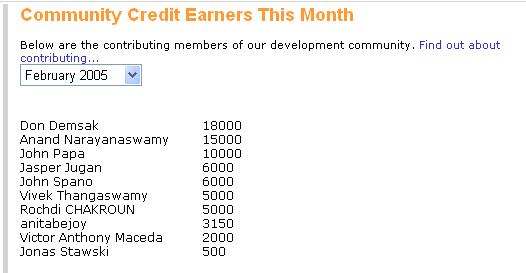
Community Credit topper...

One among the top 10 in September 2005

One among the top 10 in November 2005
One among the top 10 in October 2005
One among the top 10 in December 2005
One among the top 10 in March 2005
One among the top 10 in February 2005


http://www.community-credit.com/


Wednesday, November 29, 2006

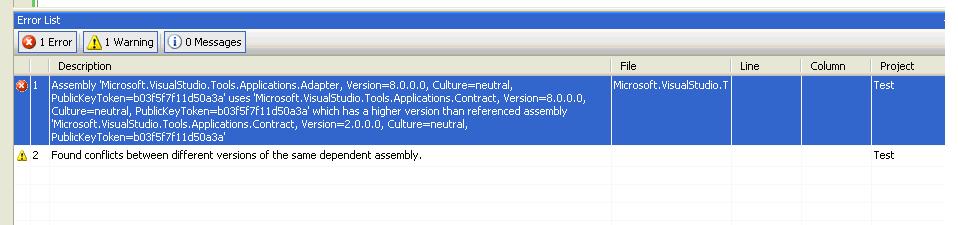
'Microsoft.VisualStudio.Tools.Applications.Adapter, Version=8.0.0.0, Culture=neutral, PublicKeyToken=b03f5f7f11d50a3a'

Error 1 Assembly 'Microsoft.VisualStudio.Tools.Applications.Adapter, Version=8.0.0.0, Culture=neutral, PublicKeyToken=b03f5f7f11d50a3a' uses 'Microsoft.VisualStudio.Tools.Applications.Contract, Version=8.0.0.0, Culture=neutral, PublicKeyToken=b03f5f7f11d50a3a' which has a higher version than referenced assembly 'Microsoft.VisualStudio.Tools.Applications.Contract, Version=2.0.0.0, Culture=neutral, PublicKeyToken=b03f5f7f11d50a3a' c:\Program Files\Microsoft Visual Studio 8\Common7\IDE\PublicAssemblies\Microsoft.VisualStudio.Tools.Applications.Adapter.dll Test


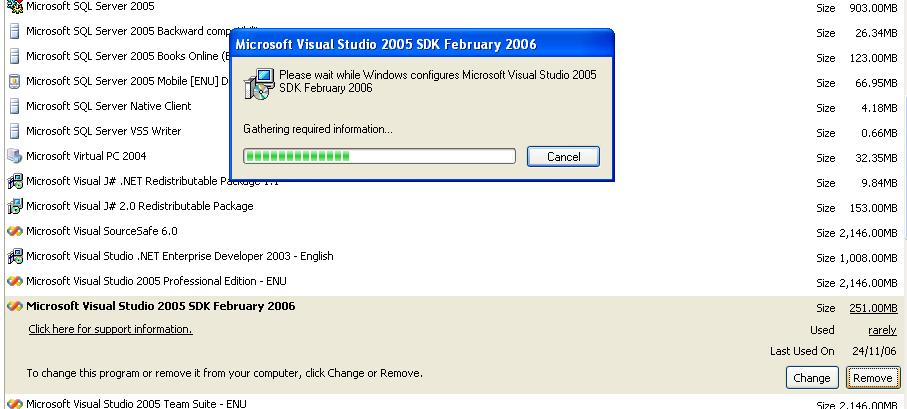
When i got this error i tried to uninstall the Visual Studio 2005 SDK Feb release from my system. Now the problem get solved.


For more check out these articles.
http://msdn2.microsoft.com/en-us/library/zdc263t0.aspx
http://www.summsoft.com/blogs/garyvsta/default.aspx

Saturday, November 18, 2006

New Technology discussion group in MSN - Join Now

Here is one of the best interactive community for All Technologies. All technology lovers and programmers come lets add power to your technical skill.

Join Now

http://groups.msn.com/DevelopersParadise

Thursday, November 16, 2006

Unsafe Code in C#

Unsafe code is formally denoted as unmanaged code .NET. Unmanaged codes as the possibility to use the pointers in the .NET managed code. Basically .NET hides most of the memory management; it makes all the .NET programmer and developers easier for development. Commonly there is need to use the unsafe code in our application while using Microsoft .NET.

When and why should we need this unsafe or unmanaged code in .NET? The answer is if you want to access memory mapped devices or if you want to create an application that to interface with your operation system, while using pointer to increase your application performance, External functions, in some cases you might need to write an application that analyzes another application process and memory etc, we need this unmanaged code, it will be more advantageous when we use this in those situations.

Some of the main advantages about the unsafe code in .NET are performance and flexibility, compatibility like DLLImport, memory addresses.

Some of the notable disadvantages about the unmanaged code in .NET are Complex to implement in C#, you should be more careful while using pointers in .NET application, miss use of pointer will cause many problems like stack overflow, overwrite existing or other variables, unauthorized access to memory areas, simple mistake in using pointers might lead your application to crash randomly and unpredictably, using pointers will cause the code to fail in the .net type-safety checks.

Sample unmanaged code snippet:

DllImport("shell32.dll", SetLastError = true)]
extern public static bool
ShellExecuteEx(ref ShellExecuteInfo lpExecInfo);
public const uint SW_NORMAL = 1;
static void OpenAs(string file)
{
ShellExecuteInfo sei = new ShellExecuteInfo();
sei.Size = Marshal.SizeOf(sei);
sei.Verb = "openas";
sei.File = file;
sei.Show = SW_NORMAL;
if (!ShellExecuteEx(ref sei))
throw new System.ComponentModel.Win32Exception();
}


For more reference

Sunday, November 12, 2006

Show/Hide a row in ASP.NET DataGrid

In this article i'm goin to explain you how to show or hide a certain row in the ASP.NET datagrid using JavaScript. First populate your datagrid with some records. Here in this example i have populated my datagrid with one sample XML file.

Sample XML document structure:

<movies>

<movie movieid="1000">

<moviename>Dr.No</moviename>
<artist>James Bond</artist>
<year>1970</year>
<language>English</language> <image>anne_hathaway90x80.jpg</image>
</movie>
<movie movieid="1001">
<moviename>Raja</moviename>
<artist>Raja</artist>
<year>1990</year>
<language>Hindi</language> <image>dogsfri90x80.jpg</image>
</movie>
</movies>

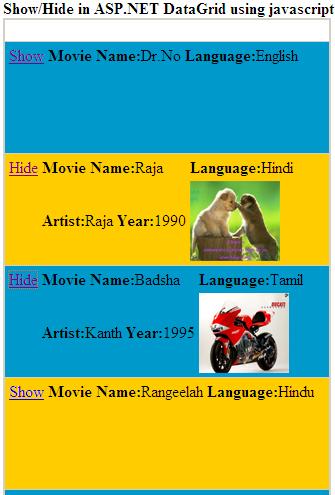
After populating the grid, my grid shows like this...


The following code part is used for populating my datagrid in my ASP.NET page. autoGenerateColumns is set to False in order to manipulate the columns manually.

string SampleDataToPopulate = Server.MapPath("sampledatafile.xml");
DataSet dataSet = new DataSet();
dataSet.ReadXml(SampleDataToPopulate);
dgShowHide.DataSource = dataSet;
dgShowHide.DataBind();

and with DataBinder.Eval in the ItemTemplate of the datagrid, i'm populating my data.


JavaScript to do Show/Hide in ASP.NET Datagrid:

The javascript function loops through the arguments and sets up an element object to change the visibility to hidden or visible for the datagrid table row.

JavaScript Fuction:

function chgTextDetails(link)
{
link += "link";
linkText = document.getElementById(link);
linkText.firstChild.nodeValue;
if (linkText.firstChild.nodeValue == "Hide")
{
linkText.firstChild.nodeValue = "Show";
}
else
{
linkText.firstChild.nodeValue = "Hide";
}
}

After implementing all these part of code and we will get the complete solution for show hide operation in the ASP.NET Datagrid. After implementing the grid looks like. The screen clips as follows.


Here is the completed and running solution is aatached. Download The SourceCode

Saturday, November 11, 2006

C# to VB.NET and VB.NET to C#

Some important and usefull links for .NET programmers. Here in this blog you can get some of the usefull C# to VB.NET and VB.NET C# online code conversion websites.

C# to VB.NET Links:

http://www.kamalpatel.net/ConvertCSharp2VB.aspx

VB.NET to C# Links:

http://www.carlosag.net/Tools/CodeTranslator/Default.aspx

http://www.developerfusion.co.uk/utilities/convertvbtocsharp.aspx

Tuesday, November 07, 2006

"LoaderLock was detected" Error when debugging my .NET DirectX code sample:

When tried to develop a video player in .NET 2.0 and Visual Studio 2005 Team Suite using DirectX SDK I was stuck with this error. I tried the same code in .NET1.1 and Visual Studio 2003, the code runs fine, no "LoaderLock was detected" error. Then I started exploring about the error I got while using Visual Studio 2005.

Check this original error message:

LoaderLock was detected
DLL 'C:\WINDOWS\assembly\GAC\Microsoft.DirectX\1.0.2902.0__31bf3856ad364e35\Microsoft.DirectX.dll' is attempting managed execution inside OS Loader lock. Do not attempt to run managed code inside a DllMain or image initialization function since doing so can cause the application to hang.

Managed Debugging Assistants is also referred as MDA, MDA work with the Common Language Runtime (CLR) to provide information on runtime state. They generate information about runtime events. Load Lock is one of the MDA available in .NET framwork, the code part which exist in all Managed DirectX 1.1 assemblies, is the reason to MDA firing. The most common failure when executing code inside the operating system's loader lock is that threads will deadlock when attempting to call other Win32 functions that also require the loader lock.

The only thing that seems to hold this situation is simply to turn off the MDA for LoaderLock, which is not recommended solution.

Global registry key which is used to turn on/off MDA.

[HKEY_LOCAL_MACHINE\SOFTWARE\Microsoft\.NETFramework]
"MDA"="1"

Better options to work around this problem are...

Look at the stack trace for the thread that has activated this MDA. The thread is attempting to illegally call into managed code while holding the operating system's loader lock. You will probably see a DLL's DllMain or equivalent entry point on the stack. The operating system's rules for what you can legally do from inside such an entry point are quite limited. These rules preclude any managed execution.

To go back to Visual Studio 2003 and .NET 1.1 . Else disable the loader lock Managed Debugging Assistants. Debug/Exceptions, Open the Managed Debugging Assistants tree node and uncheck Loader Lock. This setting is per solution so it will only affect this solution.

Tips:

In VS2005, go to the Debug->Exceptions menu. Within the Exceptions dialog expand the "Managed Debugging Assistants" node. Look for LoaderLock and uncheck the "Thrown" column.
Note: Do not disable all MDAs by setting MDA="0" in the registry as it causes problems.

Mixed managed/unmanaged C++ assemblies built for .NET Framework versions 1.0 or 1.1 generally attempt to execute managed code inside the loader lock unless special care has been taken. .NET 1.1 Managed DirectX assemblies when used with Visual Studio 2005 and .Net 2.0.

Learn About MDA:

Diagnosing Errors with Managed Debugging Assistants

Microsoft Helps related to this problem:

Managed Debug Assistants (MDAs) are cool.

Microsoft Visual Studio 2005 to debug a Microsoft Foundation Classes (MFC) class library application
Mixed DLL Loading Problem

Sunday, November 05, 2006

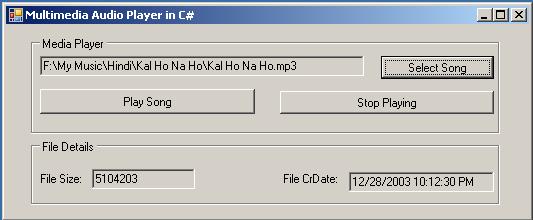
Using C#.NET play multimedia files - Using Multimedia Control Interface(MCI)

Multimedia is the best way to enhance the user interface of any application. In .NET there is many ways to play an Audio using any .NET technology supporting languages. One of the simple way to acheive is Multimedia Control Interface, shirtly we call it as MCI, wrapping high-level system components, such as Windows Media Player to play our audio files.

About Media Control Interface (MCI):

The Media Control Interface (MCI) provides standard commands for playing resource files. MCI's standard commands are a generic interface to almost all kind of multimedia devices. Media Control Interface provides applications with device-independent capabilities for controlling audio. MCI - High level multimedia control functions, Has commands common to all multimedia hardware. Possible since most use record/play metaphor Open a device for input or output If input, record; If output, play When done, close.

There are two different forms of MCI, one is Send command messages (like Windows messages) to MCI (need to include bit-encoded flags and C data structures) and another one is Send text strings to MCI Good for use from scripting languages with string functionality and simple to use MCI converts them to command messages.

Sending Strings to MCI:

error = mciSendString(sCmd , sRetStr, iReturn, hCallback);
· sCmd--themci command string (specifies command & device)
· sRetStr--return string buffer (NULL if none used)
· iReturn--size of return string buffer (0 if none used)
· hCallback--Handle to Callback window (NULL if none used)
– Returns 0 if command is successful, error code if not
· Can be used as a parameter to mciGetErrorString()
– Many command strings possible
– mciSendString, mciGetErrorString
– MCI Command Strings

For more details or help check the MSDN.

When Using Win32 Functions From .NET

Important note, MCI is not directly accessible from .NET, also mciSendString() is C++, not C#, but still you can use MCI and other Win32 API functions from .Net languages. The key is to use “Platform Invocation Services” “Interop Services” A generalized mechanism that allows calling functions that are imported from DLLs.

Must include: System.Runtime.InteropServices namespace; And then prefix any declarations of Win32 API functions to be used.

Example:
[DllImport("winmm.dll")]
private static extern long mciSendString(
string strCommand,
StringBuilder strReturn,
int iReturnLength,
IntPtr oCallback);


For MCI functions that DLL is winmm.dll, And then use equivalent .NET language data types for the parameters and for the type returned by the function.

Some of the disadvantages to be notes:

Code is no longer managed code and it’s no longer platform independent.

mciSendString() in .NET Unmanaged Code:

Corresponding C# parameter types would be:
– string, string, uint, intPtr
– In C# DWORD is implemented as an int

strCommand - Pointer to a null-terminated string that specifies an MCI command string.
strReturn - Pointer to a buffer that receives return information. If no return information is needed, this parameter can be null.
iReturnLength - Size, in characters, of the return buffer specified by the strReturn parameter. hwndCallback - Handle to a callback window if the "notify" flag was specified in the command string.

Some MCI Command String Commands:
· open -- initializes a multimedia device
· play– starts playing an open device
· stop -- stops playing from an open device
· record -- starts recording to a device
· seek -- move to a specified position on device
· save -- saves an MCI file
· close -- closes a device and associated resources
· set -- establish control settings for the device
· status -- returns information in 2nd parameter

However, most of these libraries are designed in such a way that they cannot be used to manipulate audio samples on the fly because they do not give you access to the actual sound data.


Here in this article i have covered some basics about the MCI in .NET. You can explore more in MSDN or in any other resource centre.

>>Download The Sample Code>>

ASP.NET MVC - Sport Facility Booking system

  The project relies on some external service providers. Thus accessing them via their API requires authentication. An API Key need to be su...