Friday, September 29, 2006

Visual Studio 2005 Web Deployment Projects

In Visual Studio 2005 there no option exist for build deployment DLL for your web application by default. We need to install Visual Studio 2005 Web Deployment Projects to enable this deployment option in your visual studio 2005. A Web Deployment Project creates and maintains an MSBuild project file, and is associated in a solution with a Web Site Project or Web Application Project. Here is the download link for "Visual Studio 2005 Web Deployment Projects".

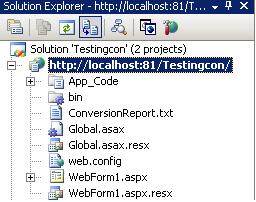
After installing select your website in your solution explorer.


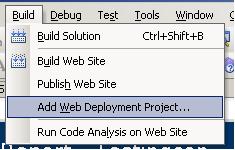
After that go to Build menu and select Add Web Deployment Project.


The Web Deployment property will be added to your website.


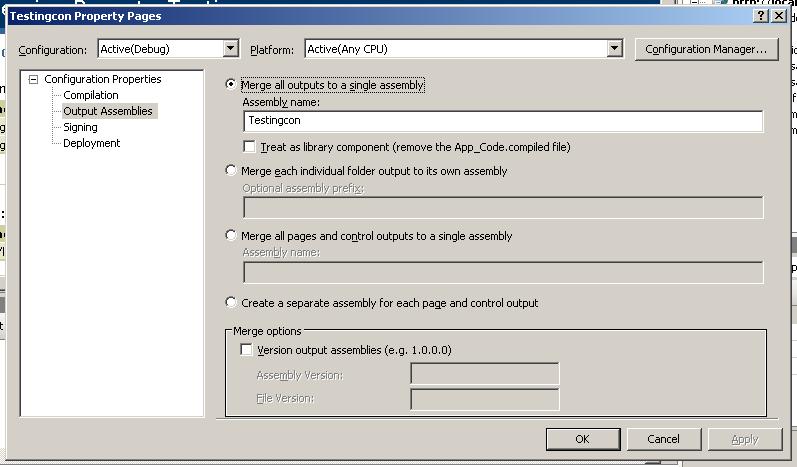
Then double click on the Web Deployment property you added to your website, the property window opens, in that you can set whatever deployment property to set for your solution.


learn more about Visual Studio 2005 Web Deployment Projects in the follow link. Learn more>>

Friday, September 22, 2006

System.Data.SqlClient.SqlParameterCollection.Add(string, object)' is obsolete: 'Add(String parameterName, Object value) has been deprecated.

For all .NET programmers who are using this

SqlCommand.Parameters.Add("@MyValue","Value");

code in ADO.NET 2.0 will get a deprecation message. Instead of using this code, you need to use the following code

SqlCommand.Parameters.AddWithValue("@MyValue","Value");

this " SqlCommand.Parameters.Add("@MyValue","Value"); " is a ADO.NET 1.1 way of coding, if you are still using this code in ADO.NET 2.0, you will get the following warning message.

" 'System.Data.SqlClient.SqlParameterCollection.Add(string, object)' is obsolete: 'Add(String parameterName, Object value) has been deprecated. Use AddWithValue(String parameterName, Object value). http://go.microsoft.com/fwlink/?linkid=14202' C:\Documents and Settings\501597\My Documents\Visual Studio 2005\WebSites\mytool\MyFirstPage.aspx.cs 149 10 C:\...\doc\ "

This is because of some other API changes in the framework. Checkout the list of obsolete changes in the following links
http://msdn.microsoft.com/netframework/programming/obsoleteapi/ObsByAssembly.aspx
http://www.gotdotnet.com/team/changeinfo/default.aspx

Tuesday, September 19, 2006

XML and XSLT transformation using C#.NET

With XML Document you can illustrate data hierarchically without caring about the later output format, and with XSL-Transformations you have the ability to convert the data content of that XML document into various formats such as text, xml, html etc. XSLT, the extensible style sheet language for transformations, is a language that provides the mechanism to transform and manipulate XML data. It is used to transform XML documents into another documents, for example other XML document, HTML document or text document. XSLT processors parse the input XML document, as well as the XSLT style sheet and then process the instructions found in the XSLT style sheet, using the elements from input XML document.

Here in this sample I have explained you the XML and XSLT transformation using C#.NET 2.0.
C#.NET 2.0. Before transformation my tool will look like this...


After you select your XSLT and XML files when you click on the preview button the output is displayed as HTML in the webBrowser control.


For more see the sample code...


XPathDocument xmlFileDoc = new XPathDocument(txtxmlfilepath.Text.ToString());
XmlTextWriter myWriter = new XmlTextWriter("result.html", null);
XslCompiledTransform XSLpreview = new XslCompiledTransform();
XSLpreview.Load(txtxslfilepath.Text.ToString());
XSLpreview.Transform(xmlFileDoc, null, myWriter);
myWriter.Close();
webBrowser1.Navigate(@"C:\result.html");

Download The Sample Solution

Monday, September 04, 2006

How to store errors in the trace.axd

Using Trace.xsd in asp.net applications is a nice feature to log errors. To get this work you have to create a web.config which must reside in the application root folder.

The web.config looks like this:

Now whenever an error occurs it is logged and can be accessed via the following url: http://localhost/urapplication/trace.axd

I use the user name "superuser" for illustration only. You could also say .

Depending on if you are using Forms authentication or Windows authentication, you'd either use a user/role name that you've defined, or one that Windows defines such as "USER\Administrators" or DOMAIN\youraccount

Features enriched in Visual Studio 2005 Team Suite

Visual Studio 2005 Team System is a productive, integrated, and extensible suite of lifecycle tools that expands the Visual Studio product line to enable greater communication and collaboration among software development teams. With Visual Studio 2005 Team Suite organizations can ensure greater predictability and quality early and often throughout the development process.

Key features enriched in VSTS:

Automatic and Manual Conflict Resolution Tool: The Automatic and Manual Conflict Resolution Tool handles issues caused by multiple users working on different versions of the same file.

Atomic Checkins: Team Foundation Server enforces atomic check-in to help maintain the integrity of files under source control.

Auto-Using: The Visual Studio 2005 Integrated Development Environment (IDE) includes Smart Tag support for auto-using statements.

Branching: Branching allows the creation of multiple similar code bases.

Bug List: With Visual Studio Team System (VSTS), you can easily find, track, and view bugs by using the Bug List report.

Better ASP .NET Source Code Editing: With the Visual Studio 2005 source code editor, Intellisense and new features for formatting, navigating and validating your HTML markup are available throughout your files.

Built-in SQL Server 2005 Express Support: You can develop and debug database objects for your application in Visual Studio 2005, even if you don't have access to SQL Server 2005.
Caching Improvements: Team Foundation Server is ideal for geographically distributed teams because of its server-based nature.

Check-in Notes: With Team Foundation Server Check-in Notes, administrators may collect data from users during the check-in process.

Check-in Policy: Team Foundation Server check-in policies provide a way for administrators to enforce development practices across a development team.

Thursday, August 17, 2006

Microsoft Office 2003: Microsoft InfoPath 2003 Performance tuning

Overview of the solution:

The Solution here highlights how a Microsoft technology is used in critical business problems using solutions built with the Microsoft Office System. Microsoft InfoPath 2003 is one of the new office tools available with Microsoft Office 2003. Microsoft InfoPath 2003 gather information flexibly and efficiently in rich, dynamic forms and more effectively share, reuse, and repurpose information throughout your team or organization. InfoPath 2003 helps improve collaboration and decision-making to positively impact your business. While developing solutions using InfoPath 2003 most of the developers will face this performance issues and struggle to overcome from it, here in this article I provide some of the valuable tips and tricks that will definitely increase your InfoPath 2003 solution’s performance.

InfoPath 2003 Performance tuning tips and tricks:

If the view contains many controls, and especially if they are repeating controls such as repeating tables and repeating sections, you should separate the view into multiple views to reduce the amount of HTML rendering that InfoPath is required to do.

Always try to Use Expression Box to display calculated value, if you don't need to storethat value. If you have business logic to trigger all the calculation, pleaseonly trigger necessary calculation. Triggering large amount of calculationsis costly process.

Rules: About the form XSL, and XSF, anything in the XSF is extremely slow,anything in the XSL is acceptable, or fast, so when we develop a form, we have toreview these files frequently, for example, the conditional formatting goesto the XSL, it is ok, the speed is acceptable. But rules are going to the XSF, then we try to find a way to convert them to C# code, some of the things we do can become C# some not, once it is C# (with the custom event handlers), the speed increases dramatically.

Views: About the multiple views in a form, we found that if the form have one or10 views, does not matter, unless that increases the size of the XSF, then thespeed goes down.

NOTE: Not all the things in the XSF are slow; some of the items are fast

xml DOM: Be cautious while using replace node function on the xml DOM in the C#code, replacing large amount of nodes is very slow, it seams a DOM problem,talking about a 1MB of xml, ironically, loading 10MB of xml in the DOMusing the DOM function is extremely fast, so the speed is different perfunction.

Avoid using more number of tables (data or layout) in any single view. Avoid large repeating data structures that can grow too many pages. Avoid complex nesting of optional and repeatable sections. These are quite complicated to layout and also can quickly cause a single view to become very large.

Be aware of exactly what your business logic does. For example, onAfterChange can fire multiple times for a single edit.

Try to avoid querying data at the form load event. Rather than querying for all the data then having InfoPath just show a small amount, refine your query and only bring the data you plan on displaying into InfoPath. Don’t pre-populate data sources that aren't necessary on load. Don't set up un-used data source. Merge static xml data sources into one if you have multiple xml data connections.

Limit the number of drop-down list boxes that contain many items, especially within repeating controls. Internet Explorer renders each drop-down list box with its own window handle (HWND), and the HTML representation of a drop-down list box with many items is significant.
Friday, August 04, 2006

Adding Custom ToolBar Button in your InfoPath 2003 Form

Adding Custom ToolBar Button in your InfoPath 2003 Form. Open the Manifest.xsf file.
Find the xsf:mainpane tag in the manifest file and then Insert the following code after the xsf:mainpane tag in the manifest

<xsf:toolbar caption="myToolbar" name="myToolbar">

<xsf:button name="tlbSave" caption="Save Data"> </xsf:button>

</xsf:toolbar>


Finally You must create an event handler for the OnClick event associated with each of these buttons for them to be functional. This will show you button with "Save" Text return on it.

Displaying HTML content in any of the InfoPath 2003 form’s control

Displaying HTML content in any of the InfoPath 2003 form’s control – the Rich Text Box control can be used to copy and paste any content except the HTML content.

Open corresponding XSL file of your InfoPath Template and select the field in which your going to use the HTML as input. Your control element will be like this

<xsl:value-of select="my:field1" >

What you have to so is just add one attribute called “disable-output-escaping”. And set that attribute to yes.

<xsl:value-of select="my:field1" disable-output-escaping="yes">

Hiding a control through code - InfoPath 2003

Hiding a control through code in infopath

public bool ControlProperty()
{
return true;
}


In the property window of your InfoPath control, select Display tab, Click on conditional formatting button, then click add button, select Expression box in the 1st drop down box, and add the code xdExtension:ControlProperty() in the text box and select the property you want to set for that control and click ok.

Setting Focus on Controls - InfoPath 2003

Setting Focus on Controls in your infopath forms.

// Code For Setfocus
IXMLDOMNode nodeSelText = thisXDocument.DOM.selectSingleNode("/my:myFields/my:field1");
thisXDocument.View.SelectText(nodeSelText,Type.Missing);

Custom save Code in InfoPath 2003

To enable or disable save functionality

In the design mode of InfoPath, on the Tools menu, click Form Options. Click Open and Save. Click Open and Save. In the Enable Features section, select the options appropriate for your form. In the Save behavior section, you have a check box option called Save using custom code. If you select this option and click Edit, you create the OnSaveRequest callback function in your form code.

public void OnSaveRequest(SaveEvent e)
{
if (thisXDocument.IsNew == true e.IsSaveAs == false)
{
e.IsCancelled = e.PerformSaveOperation();
e.ReturnStatus = true;
}
else
{
thisXDocument.UI.Alert("The 'Save As' functionality is disabled for forms that are not new.");
}
}
  • ReturnStatus = true, IsCancelled = true The form is not saved, but the OnSaveRequest function is successful.
  • ReturnStatus = true, IsCancelled = false The form is saved, and the OnSaveRequest function is successful.
  • ReturnStatus = false, IsCancelled = true The form is not saved, an error is thrown, and an error message appears to the user.
  • ReturnStatus = false, IsCancelled = false The form is not saved, an error is thrown, and an error message appears to the user.

Wednesday, August 02, 2006

Columns hide in Winforms Datagrid

This code is to hide the columns in the DataGrid in WinForms Application.

DataGridTableStyle ColHidStyle = new DataGridTableStyle();
ColHidStyle.MappingName = "HideTest";
dataGrid1.TableStyles.Add(ColHidStyle);
ColHidStyle.GridColumnStyles["Modifier"].Width = 0;

or other way is

objDs.Tables["myTableName"].Columns["myColumnName"].ColumnMapping = MappingType.Hidden;

custom number formatting in C#

One of the painful things about good old ASP was string formatting; VBScript simply didn't have anything useful. C# do, but MSDN doesn't provide a quick reference to the formatting options. So here's a quick reference. The C# equivalent for sprintf is String.Format, which takes a format string and the arguments. It returns a string, and because you're not passing in a buffer there's no chance of a buffer overflow.

string outputString = String.Format("At loop position {0}.\n", i);

The ToString method can accept a string parameter which tells the object how to format itself. In the call to String.Format , the formatting string is passed after the position, for example, "{0:##}". The text inside the curly braces is {argumentIndex[,alignment][:formatString]}. If alignment is positive, the text is right-padding to fill the specified field length, if it's negative, it's left-padded.custom number formatting

specifier type format output
(double 1234.56)
0 zero placeholder {0:00.000} 1234.560
# digit placeholder {0:#.##} 1234.56
. decimal point placeholder {0:0.0} 1234.6
, thousand separator {0:0,0} 1,235
% percentage {0:0%} 123456%


Some of the code i tried...

//decimal stingDate = Convert.ToDecimal( "79798797987.96999797696");
//string stgDate = String.Format("{0:$#,##0.00;($#,##0.00);Nothing}", stingDate);
//string stingDate = String.Format("{0:$#,##0.00;($#,##0.00);Nothing}", str);
//MessageBox.Show(stgDate);

string stingDat = System.DateTime.Today.Date.ToShortDateString();
int day = DateTime.Parse(stingDat.ToString()).Day;
MessageBox.Show(day.ToString());
int month = DateTime.Parse(stingDat.ToString()).Month;
MessageBox.Show(month.ToString());
int year = DateTime.Parse(stingDat.ToString()).Year;
MessageBox.Show(year.ToString());
DateTime curSysDate = new DateTime(year, month, day);
MessageBox.Show(curSysDate.ToShortDateString().ToString());

Calling the Open With dialog box from your application, using C#

This article is to introduce shell programming with C# for beginners in .NET. The Shell namespace organizes the file system and other objects managed by the Shell into a single tree-structured hierarchy. Conceptually, the Shell namespace is essentially a larger and more inclusive version of the file system. The Shell namespace objects include file system folders and files, along with "virtual" objects, such as the Recycle Bin and Printers folders. One of the primary responsibilities of the Shell is managing and providing access to the wide variety of objects that make up the system. Here, I have created a sample for demonstrating how to call the Open with dialog box in your Windows system.

Here in this article, I have developed a simple image viewer application to demonstrate the Open with dialog box in Windows, using C#. It’s really hard to explain the Shell concepts. This application is developed using Microsoft Visual C# Express Edition.
A struct-declaration consists of an optional set of attributes, followed by an optional set of struct-modifiers, followed by the keyword struct and an identifier that names the struct, followed by an optional struct-interfaces specification, followed by a struct-body, optionally followed by a semicolon. And the Serializable keyword indicates that a class can be serialized. This class cannot be inherited.

[Serializable]
public struct ShellExecuteInfo
{
public int Size;
public uint Mask;
public IntPtr hwnd;
public string Verb;
public string File;
public string Parameters;
public string Directory;
public uint Show;
public IntPtr InstApp;
public IntPtr IDList;
public string Class;
public IntPtr hkeyClass;
public uint HotKey;
public IntPtr Icon;
public IntPtr Monitor;
}
// Code For OpenWithDialog Box
[DllImport("shell32.dll", SetLastError = true)]
extern public static bool
ShellExecuteEx(ref ShellExecuteInfo lpExecInfo);
public const uint SW_NORMAL = 1;
static void OpenAs(string file)
{
ShellExecuteInfo sei = new ShellExecuteInfo();
sei.Size = Marshal.SizeOf(sei);
sei.Verb = "openas";
sei.File = file;
sei.Show = SW_NORMAL;
if (!ShellExecuteEx(ref sei))
throw new System.ComponentModel.Win32Exception();
}

Tuesday, May 30, 2006

ConfigurationSettings.AppSettings["SQLConnString"]; -- Become Obsolete in .NET 2.0

Recently when I tried to create a data access component for my web application in .NET 2.0 I found that ConfigurationSettings class as become obsolete. In .Net 2.0 ConfigurationManager class that replaces ConfigurationSettings.

“System.Configuration.ConfigurationSettings.AppSettings["SQLConnString"]; this method is obsolete, it has been replaced by System.Configuration!System.Configuration.ConfigurationManager.AppSettings"

The System.Configuration.ConfigurationSettings.AppSettings["SQLConnString"];
Will give your warning that this “this method was obsolete”. What to do in order to use ConfigurationManager class? System.Configuration.dll - ensure you add a reference to this assembly. In .NET 2.0 all configuration functionality is in this separate assembly now.

ASP.NET MVC - Sport Facility Booking system

  The project relies on some external service providers. Thus accessing them via their API requires authentication. An API Key need to be su...